- CVI 정보나눔(www.cvi.kr)
- 스터디
- 강좌,팁,유용한것
강좌,팁
글 수 116
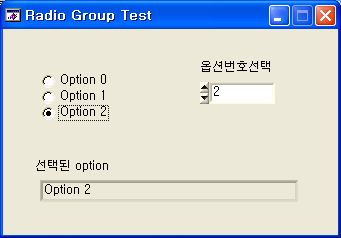
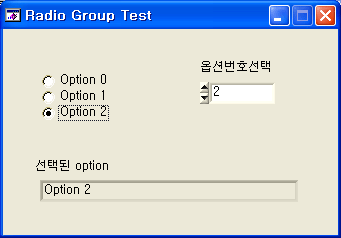
Custom Controls - Toolslib Controls - Radio Group 를 사용하기 위한 절차
(LabWindows/CVI 7.1에서 테스트한후 작성하였습니다.)
Radio Group는 Tree Control을 응용한 Custom Control입니다.
Radio Group 전용의 함수외에는 Tree Control 함수를 이용하면 됩니다.
1. Radio Group 컨트롤을 UIR 파일에 추가합니다.
(Custom Controls - Toolslib Controls - Radio Group 에 있음)
2. radioGroup.fp 를 프로젝트에 추가합니다.(자동추가될 수도 있음)
3. radioGroup.h 헤더파일을 include 합니다.(자동추가될 수도 있음)
#include "radioGroup.h"
4. 프로그램 시작시에 Panel을 Load한후에 다음 함수를 한번 호출해 줍니다.(자동추가될 수도 있음)
Radio_ConvertFromTree (panelHandle, PANEL_RADIOGROUP);
5. Radio Group에 대한 콜백함수는 아래 샘플 함수처럼 구성합니다.
//RADIO() is called anytime the user clicks the radio button control. In this example,
//this callback updates a numeric indicator with the currently selected option.
int CVICALLBACK RADIO (int panel, int control, int event,
void *callbackData, int eventData1, int eventData2)
{
int a; //This variable stores the value of the radio button control.
switch (event)
{
case EVENT_MARK_STATE_CHANGE:
//This function gets the current selection from our radio button group and stores it in "a".
Radio_GetMarkedOption (panelHandle, PANEL_RADIOGROUP, &a);
//This function sets the indicator labelled "Selected button".
SetCtrlVal (panelHandle, PANEL_NUMERIC, a);
break;
}
return 0;
}
추가.
또다른 샘플 소스는 아래의 주소에서 다운로드받으세요.
http://sine.ni.com/apps/we/niepd_web_display.display_epd4?p_guid=D188E62C8AB248EAE034080020E74861
* 허창원님에 의해서 게시물 이동되었습니다 (2005-07-14 17:35)